
.svg "English")
.svg "Deutsch")
The Lucky Blocks mod for Minecraft is especially popular in YouTube videos. This is because the lucky block has a lot of surprises hidden in it. So it can happen that it has devastating effects on your Minecraft world. Therefore, luck should always be on your side so that you only get positive effects. It’s best to try out the mod in a new world first. It would be really frustrating if your buildings would be destroyed. But this is not the only possibility for a test run. There are numerous Lucky Blocks servers. These servers make it easy for you to have a battle with your friends. By the way, there are over 100 possible outcomes. They influence the gameplay and every time it’s a thrill because it’s like opening a loot box. For example, items, chests, mobs, potions, and enchantments are covered.
How To Use Lucky Blocks Mod

At first, the Lucky Blocks mod looks very unimpressive. However, you will soon notice that the project is incredibly complex. First, you need the lucky block that is always being mentioned. Nothing works without it. The Lucky Block can have a luck level between 100 and -100. The higher the value, the better the reward. Besides, you only get the rewards if you break down the block. This term is not appropriate for a negative result, because then you are punished and not rewarded.
The block is generated in all Minecraft dimensions, and the other blocks in the surrounding area show you how positive the result will be. A fancy temple made of quartz is of course more advantageous in the environment than just a ruin. The luck level in temples is between 50 and 100, which is why you should always hope for this building.
In contrast, the luck for ruins is between -50 and -100. It is not advisable to mine the Lucky Blocks there because you will get a bad outcome anyway. Also, there is a small chance that a Lucky Block will be generated right next to your spawn point. Unfortunately, this is not always the case. Furthermore, there are three more variants in the creative mode that can have the luck of 80, 0, and -80. You can get them from the inventory.
How To Get a Lucky Block
However, it is quite difficult to find a Lucky Block, which is why you can also make one yourself. On average, you have to walk over 1000 blocks for one Lucky Block. Craft them is simple and does not involve any major difficulties. First, you have to search for gold in a cave and melt it into gold ingots. You also need a dispenser. You make it with a bow, Redstone dust, and seven cobblestones. Now go to your crafting table and place the items as follows: In the middle is the dispenser and in the remaining fields are the gold ingots. The crafted Lucky Block has a default luck level.
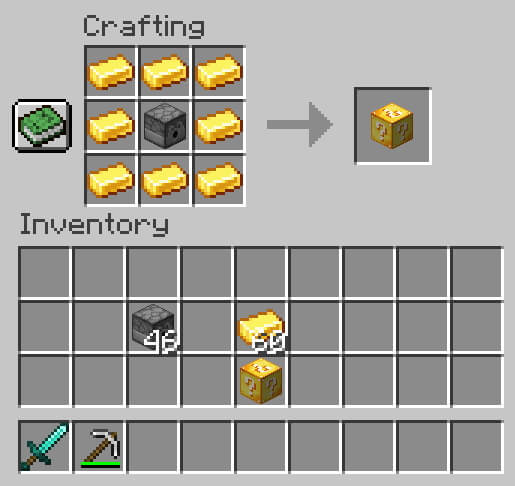
Modify the Luck Level
You can increase luck by using more precious ores for crafting. Diamonds and emeralds can increase luck fivefold. Of course, this also works in the other direction. For example, you can put fermented spider eyes or puffer fish on the crafting table. As a result, the probability of a negative outcome is significantly increased. This makes little sense for yourself, but you can troll a friend on servers and realms.
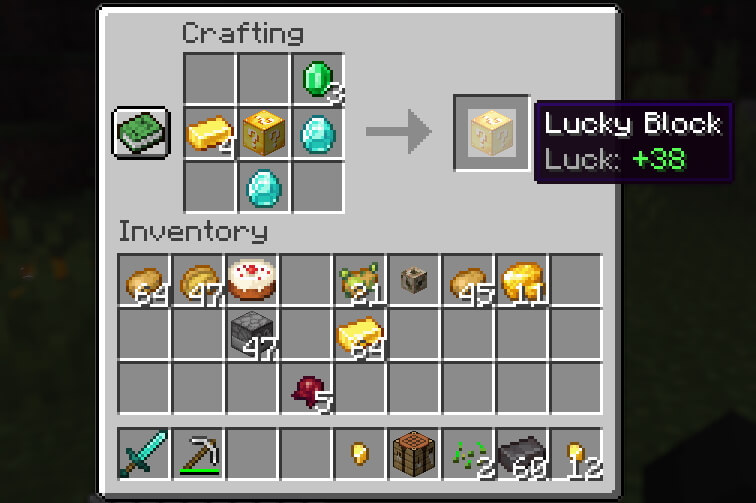
Overall, there are over 15 items that affect the luck level. You use the following if you want to add a higher level. The increase in luck is written in brackets.
- Diamond block (100)
- Enchanted gold apple (100)
- Nether star (100)
- Emerald block (80)
- Gold block (60)
- Golden apple (40)
- Iron block (30)
- Diamond (12)
- Emerald (8)
- Gold ingot (6)
- Iron ingot (3)
The things from the list are not generated so often in your game world. As a result, it takes a long time until you have found a sufficient number of everything. The X-Ray mod, which immediately shows you all ores and dungeons, can help here. X-Ray will make the mining of ores at least twice as fast. Nevertheless, there are also items that lower your luck level:
- Fermented spider eye (-20)
- Pufferfish (-20)
- Poisonous Potato (-10)
- Normal spider eye (-10)
- Rotten flesh (-5)
How To Install Lucky Blocks
You can play the Lucky Blocks mod with any Minecraft version that has been released since 2013. You probably won’t want to play an older version anyway. The installation is very simple and can be done in a few minutes.
- First, you install a mod loader. You can choose between Forge and Fabric, both of which have their advantages and disadvantages.
- Then click on one of the Lucky Blocks mod download links in our download section.
- You will be redirected to the official website. Scroll down until you see the heading “Download”. Here you have the choice between Forge, Fabric and Bedrock Edition download links.
- Click on one of the buttons and you will be redirected again. Now you will see all the important information, such as the required mod loader version. On the right side is always the download link.
- Move the Lucky Blocks JAR file into your .minecraft/mods folder. The best way to find the folder is to use the search bar pinned to the quick access toolbar. If you have add-ons, you need to save them in this folder: .minecraft/addons/lucky/.
- Start Minecraft and check if the newly installed mod appears in the main menu.


lucky blocks
I love these mods so much and I’m so happy you made them so thank you
Nice mod
the lucky postion crashes the game
is okey